
Check a Pet Refinement Before Pressing Replace
On this page
At a manual pet refinement result in Whiteout Survival, compare the proposed stats before pressing Replace. This starts with an existing pet; the feature requires Furnace Level 18 and enough progress in your server’s opening schedule. Pet access
Common Wild Marks are used for refinement, while Advanced Wild Marks are used for advanced refinement. Refinement materials
Compare each stat before accepting
Read each proposed value against the current one, then check Total Power. Decide whether the individual gains and losses suit what you want from the pet.
Don’t rely on a warning to catch every lower stat. The second warning is tied to a drop in Total Power, so one stat can fall without triggering its own prompt. Warning condition
If you don’t want the result, leave Replace unselected. You don’t need to roll again just to decide against a change.
Read the reduction prompt carefully
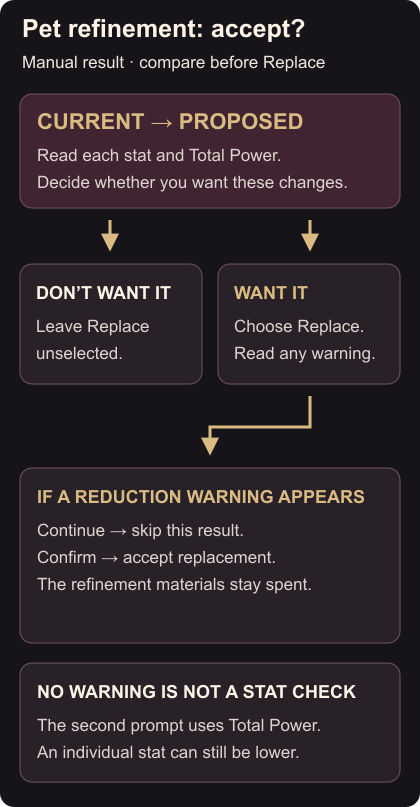
Choose Replace only when you want the proposed stats. If a reduction warning appears, its Continue option skips that result; the materials used for the refinement stay spent. Confirm accepts the replacement. Accepted refinement changes can’t be reversed. Replace, Continue and Confirm
That Continue instruction applies to the reduction warning. Read the prompt before choosing, then check the pet’s displayed stats after any accepted replacement.
A secondary stat’s quality can stay at its improved tier even when its numeric bonus falls later. Retaining the quality doesn’t mean every proposed value is higher, so keep comparing the numbers. Quality after refinement
For your island bonuses, check which decorations count. For tree clearing, check Lumber Camp placement and output.