
Repair Your Tank, Put Out Fires and Understand Crew Delays
On this page
When your tank takes a hit in PC Ground Arcade, check whether you are dealing with fire, damaged machinery or a crew member changing position. Each needs a different response. A tank that can move again may still be fighting with reduced performance.
Check your recovery actions
Before joining a standard Ground Arcade match, open the ground-vehicle controls and find repair, fire extinguisher and the damage display. Use the bindings assigned in your settings. Make the recovery actions easy to reach while keeping your attention on the battle.
Open your tank’s modifications and read Improved Parts and Improved FPE where available. The Pz.IV E modification list shows these names. Check whether your chosen vehicle has the improvements unlocked and fitted before relying on them.
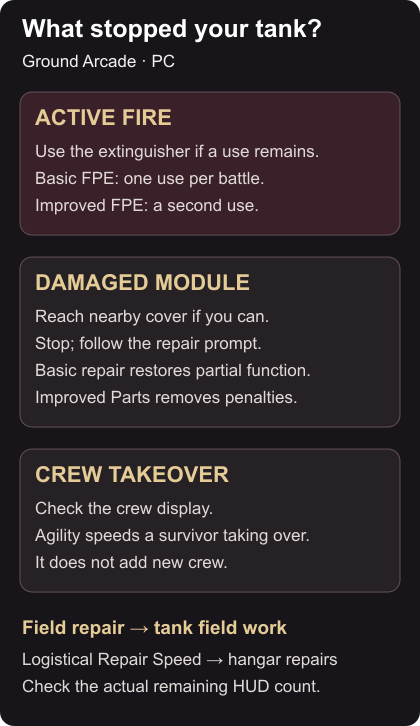
Ground vehicles have basic field repairs that restore partial module function without researching the improved kit. Improved Parts speeds repairs and removes the remaining module-function penalties. Basic FPE provides one extinguishment per battle; the improved version adds a second. Ground repair and FPE rules
Put out an active fire
When the damage display shows an active fire, use the extinguisher if a use remains. Watch the action finish, then check the remaining count. Improved FPE also speeds extinguishing. Implemented FPE changes
Do not keep taking shots while forgetting the fire warning. Once it is out, look again at the damaged components and crew. Extinguishing the flames does not tell you whether your gun and mobility are ready for another exchange.
Find cover and follow the repair prompt
If you can still move, look for nearby hard cover that blocks the enemy who hit you. Choose a short, realistic movement; a long crossing is a poor recovery plan when the tank is already struggling. If you cannot move, concentrate on the repair prompt and the enemy’s approach.
Stop for field work and follow the displayed repair action and progress. Keep watching the direction the shot came from. Avoid repeatedly cancelling an available repair just to attempt the same exposed duel.
After basic field repair, check steering, movement and gun handling before committing. Partial function may be enough to reach a better position. It does not mean you should immediately repeat the shot that left you stranded. The Ground Arcade aiming guide explains how to reconsider that shot.
Match the crew skill to the delay
Field repair improves tank repair speed and uses the crew’s average skill. Agility controls how quickly a surviving crew member takes over a fallen member’s position, also using the average. The logistical Repair Speed skill concerns hangar repairs, so it is not the skill for shortening your tank’s field work. Crew skills
Watch the crew display when a position is empty. A takeover delay is separate from a damaged module, and Agility moves surviving personnel rather than adding new crew. If field repairs are your recurring problem, spread earned Field repair experience across the crew instead of treating one member’s level as the whole result.
After the match, identify the delay that hurt most and adjust that one part of your setup. For aircraft ammunition and maintenance, use the separate Air Arcade gunnery guide.