
Use the Air Arcade Lead Marker and Keep Your Guns Ready
On this page
In PC Air Arcade, use the lead marker to place your first burst, then adjust from the target’s movement and the shot feedback. With an early propeller fighter, short firing attempts give you more chances to correct your aim before the guns run empty or overheat.
Get familiar with one fighter
Pick one aircraft for your practice and inspect its offensive guns and ammunition in the hangar. Find your assigned target-selection, fire and look-around controls. Keep those controls familiar while you learn how that aircraft’s shots travel.
Look at the actual gun layout instead of assuming every fighter has the same armament. For example, the I-16 type 10 carries four ShKAS machine guns, split between its cowling and wings. Its guns can suffer heat-related jamming. I-16 type 10 guns Use that as a reason to check your own aircraft’s weapons before borrowing advice about another one.
Follow the target’s changing movement
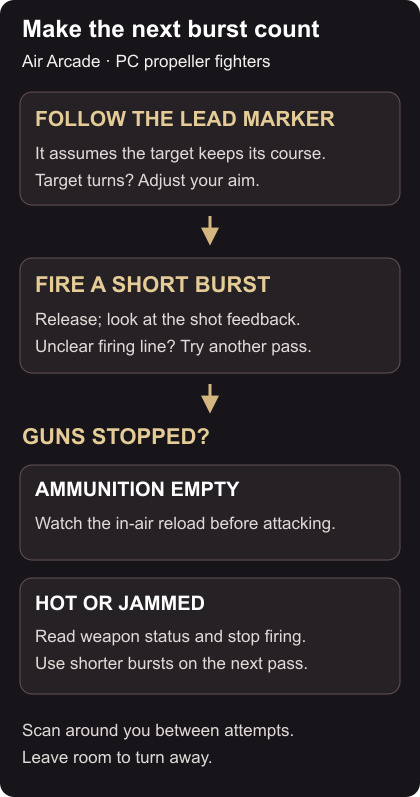
The Air Arcade lead marker appears when an enemy is in range. It predicts where the target will be when your shots arrive if its present trajectory continues. Air Arcade rules
Select an enemy whose movement you can follow and watch the marker before firing. Point your guns toward the estimate, fire a short burst and release the trigger. Look for visible tracers, if your ammunition includes them, and the hit feedback. Use that result to place the next burst.
When the enemy turns or climbs away, follow its new movement. Continuing to shoot at the old spot wastes the attempt. If you lose a clear view, release the trigger and line up again. Do the same when a friendly aircraft crosses your firing line.
Try to identify one reason for a miss. Shots passing behind the target call for another look at your lead; an unstable approach calls for a cleaner opportunity. Change the part you can see going wrong instead of adjusting every control after one failed pass.
Check why the guns stopped
Fully expended ammunition replenishes in the air during Air Arcade. In-flight reloading Check the ammunition count, reload progress and weapon status when firing stops. An empty supply and a hot or jammed gun are different problems.
While ammunition reloads, look for a way back toward friendly support. Avoid chasing an opponent just to stay close when you cannot fire. Wait for the weapons to be ready before committing to another pass, and keep room to turn away from both the target and the ground.
The aviation crew’s Reload Speed skill shortens weapon reloading in flight and on the airfield. Weapon Maintenance reduces primary-gun overheating and the chance of heat-related jamming. Aviation crew skills Match the skill to the problem you keep encountering; controlled bursts remain useful while the crew improves.
Give the next pass one purpose
Before firing again, scan the aircraft around your target. After the burst, look around once more instead of staring at the damage result while flying straight into danger. If you overshoot or lose a usable angle, leave the pass and make another approach.
Keep the same aircraft and mode while comparing the next attempt. For tank combat, the Ground Arcade aiming guide explains the penetration indicator, while the Ground Arcade repair guide covers damaged modules and crew delays.