
Unlock and Apply Carcosan Protection Modifiers
On this page
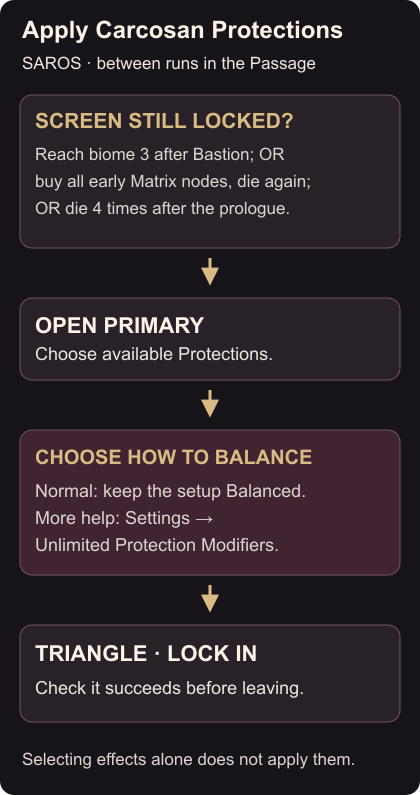
Carcosan Modifiers let you change parts of SAROS’s challenge on PS5. Open Primary in the Passage between runs to choose them. You cannot adjust them during an expedition. Accessing Carcosan Modifiers
Open the modifier screen
If the screen is missing, it unlocks through any of these conditions:
- Defeat Bastion, reach the third biome and return to the Passage.
- Unlock all available Armor Matrix nodes in the first or second biome, then die again.
- Die four times after completing the prologue.
The original unlock routes and additional early unlock condition give you several ways to reach the menu. After meeting one, check Primary again.
Choose a Protection and lock it in
Pick a Protection that addresses your immediate problem. Damage Enhancement increases damage to hostiles. Shield Power Enhancement stops the shield from consuming Power while active. Read the description of the available modifier before selecting it. Protection effects
For a normal setup, keep the screen Balanced. If too many Protections prevent you from proceeding, remove one or select a Trial whose penalty you are willing to take. Then press Triangle to Lock In. Selecting effects without locking them in will leave them unapplied. Why a modifier selection will not apply
Use Protections without balancing Trials
For more assistance, open Options → Settings, find Unlimited Protection Modifiers and turn it on. This removes the balance limit. Return to Primary, choose your available Protections and lock in the selection before leaving on the next run. Removing the balance requirement
Check that Lock In succeeds before starting. If it does not, revisit the balance state or the Unlimited Protection Modifiers setting, depending on the setup you chose.
The shield and Power Weapon guide explains the resource affected by Shield Power Enhancement. If recognising incoming attacks is the problem, use the projectile colour settings.