
Buy, Deliver and Use Items Before Your Next Teleport
On this page
A purchase helps only after it reaches your hero and is ready to use. Practise buying, delivering and checking one item before adding a teleport to the sequence.
Choose a Useful Purchase
Open the shop’s hero guide or common-item choices and read one suggested item’s purpose. Check its gold price and, for an active item, its mana requirement. Buying the item and being able to activate it are different checks. Valve’s shop and item controls
Start with a small component or consumable from your chosen guide. Confirm the selection before buying, then check where it went.
Find It in the Stash and Deliver It
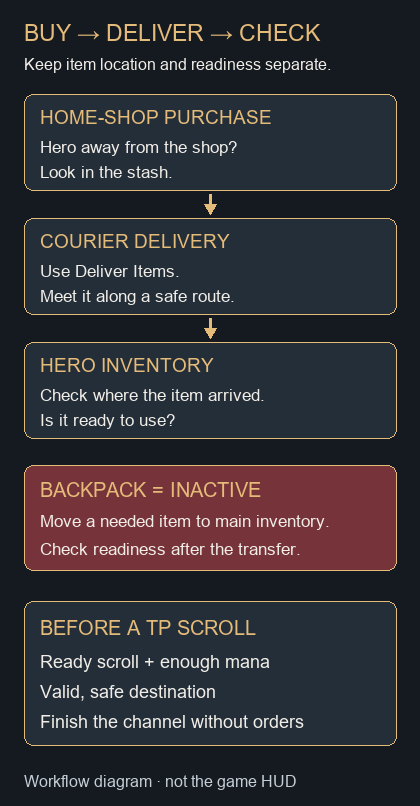
A home-shop purchase made while your hero is away normally goes to your stash. Use Deliver Items to have your courier retrieve purchases from base. The courier can be killed, making its carried items temporarily unavailable, so meet it along a safe route. Behind your tower can be a useful starting point, but check for enemies rather than assuming the tower makes delivery safe. Valve’s courier tutorial, hosted by SteamTracking
If the purchase seems missing, inspect the stash and courier before buying it again. If the courier is approaching danger, move the meeting point back toward safety.
Move Items Into Your Active Inventory
Regular items in your backpack cannot be activated or provide their passive bonuses. Move a needed backpack item into your main inventory and check its displayed readiness; a short activation delay can apply. Do this before a fight. Valve’s backpack explanation
Check where each delivery landed: it may already be in your main inventory. If an upgrade has not completed, inspect its required components and recipe. Some items can be disassembled, but do not assume every item can. Valve’s inventory and item-interaction tutorial
Finish the Teleport Safely
A Town Portal Scroll, often called a TP Scroll, requires a channel before you arrive. Select the scroll and a valid destination near a friendly tower; check the target indicator before committing. Read the scroll’s mana cost, charges and cooldown to confirm it is ready.
While it channels, avoid issuing other orders; settings affect how orders cancel a teleport. An enemy stun can interrupt it, leaving you waiting for readiness again. Choose a safe moment at your starting point and check the destination as well. Valve’s teleport tutorial
In a bot match, combine the steps: buy one item away from the home shop, deliver it, confirm its inventory position and readiness, then complete a teleport without issuing another order. If the channel stops, check for an enemy stun or an accidental command before repeating the attempt.
When the Shop Will Not Sell a Component
Some components come from a Secret Shop rather than the home shop. Check the item’s shop information and intended recipe first. Your courier has a Go To Secret Shop control, but its route still needs to be safe. Valve’s Secret Shop tutorial
Continue with your first-match practice plan and last hits and denies.