
Rebuild an Item by Filling Its Empty Cores and Slots
On this page
Use Item Rebuilding to add ingredients to an item you have already completed in Atelier Yumia. It fills unused spaces; it cannot swap out an ingredient you chose earlier. These steps use PS5 controls.
Unlock Item Rebuilding and choose the item
Learn Item Rebuilding in the Skill Tree. Learning skills costs Skill Points and opens adjoining skills, so follow the connected path if the skill is not yet learnable. Skill Tree progression
Use the altar inside the atelier or a Simple Altar in a building area. On PS5, L2 or R2 switches between Synthesis and Item Rebuilding. Select the completed item you want to improve. Switching synthesis modes
Add ingredients only to unused spaces
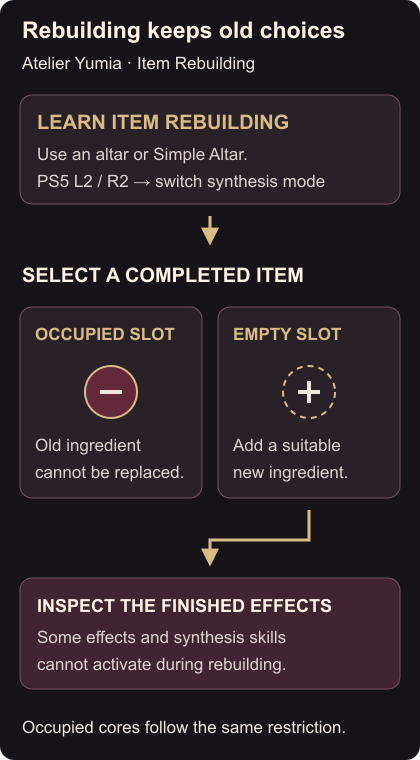
Look for a core or Alchemy Slot with no ingredient in it. Select that space and choose an ingredient to add. Compare the result with what the item already does before finishing the rebuild.
An occupied space cannot be cleared or replaced, whether its ingredient came from the original synthesis or an earlier rebuild. If every space you wanted to change is occupied, rebuilding cannot make that change. Start a new synthesis when your goal requires different ingredients in those positions. Item Rebuilding limits
Some effects and synthesis skills cannot activate during rebuilding. Inspect the finished item’s effects instead of assuming that every bonus from a fresh synthesis will apply.
Use the core synthesis guide when making a replacement item. For a crafted tool that will not appear in a quest’s delivery list, see Exploration Bag delivery.
Video guide
More Atelier Yumia: The Alchemist of Memories & the Envisioned Land guides
Browse every Atelier Yumia: The Alchemist of Memories & the Envisioned Land guide