
Use the Atlas and Place a Custom Map Marker
On this page
Use the Atlas of Plamen to look up a location, then place a custom marker to point your compass toward a spot on Alaloth’s world map. These are default PC keyboard controls; use your assigned keys if you have remapped them.
Enter Free Mode before opening the Atlas
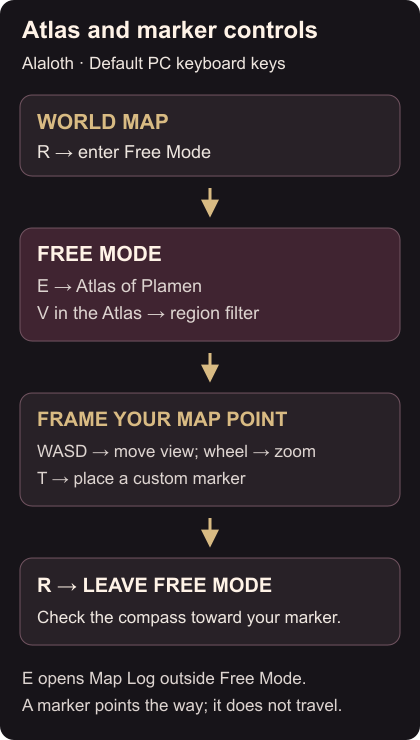
On the world map, press R to enter Free Mode. Press E there to open the Atlas of Plamen. The Atlas lists locations alphabetically, and V filters the list by region. PC map controls
If E opens the Map Log, you are still in the normal world-map mode. Enter Free Mode first and then open the Atlas. If the location you want is missing from the list you are viewing, check the region filter.
Place the point you want to follow
Look up the location in the Atlas, then return to the Free Mode map view. Use WASD to move the view and the mouse wheel to zoom. Frame the spot you want to mark, then press T to place your custom marker.
Press R to leave Free Mode. Check the compass direction toward the marker before moving your character. The marker gives you a bearing; placing it does not transport you or unlock a destination. Atlas and compass markers
Quick access to a city’s interior destinations has a separate requirement: the sublocation must be accessible and you must have visited it before. Looking it up or marking the map does not satisfy that condition. Quick-access requirements
For preparation at a service you have already reached, see blacksmith repairs and shrine respec.