
Set Sensitivity for One PUBG MOBILE Weapon
On this page
Give one gun its own sensitivity in PUBG MOBILE’s Android touch settings. Guns without a separate entry continue using the shared values.
Add the weapon before changing its values
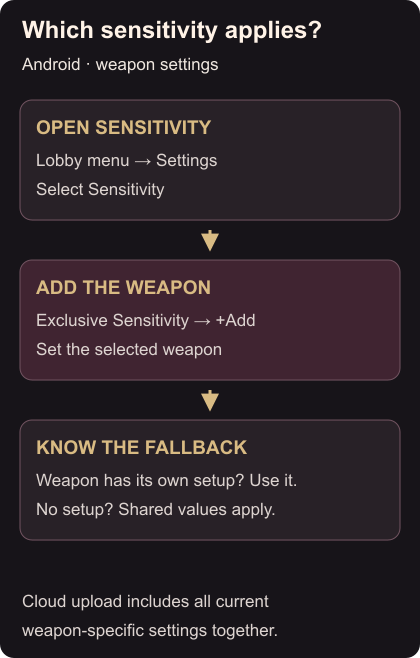
From the lobby, tap the bottom-right upward arrow, then Settings → Sensitivity. Open Exclusive Sensitivity, select +Add, and choose the weapon you want to adjust. The menu covers sensitivity for views, scopes and aiming. Weapon sensitivity instructions
Record the current values first. Confirm the selected weapon and the view or scope you want to change, then adjust one value. With that gun and scope, repeat the same aiming movement and compare how it feels. Keep the change only if controlling the aim feels easier; otherwise return to the value you recorded.
Check the fallback before uploading
If another gun feels unchanged, check whether it has its own Exclusive Sensitivity entry. A weapon without one uses the shared sensitivity. Cloud saving can help copy or share the setup, but an upload includes all current weapon settings together. Review the other entries before uploading. Shared settings and cloud saving
Sensitivity changes will not move a misplaced button. Use the touch-layout guide for that. Once the controls feel comfortable, set auto-pickup limits for supplies you keep collecting unnecessarily.