
Set Up Hades II for 120 Hz on PS5
On this page
Hades II supports 120 Hz at up to 4K, upscaled, on PS5 and PS5 Pro with a compatible display. Use the console settings below to select that output. Hades II video support
Choose the output settings
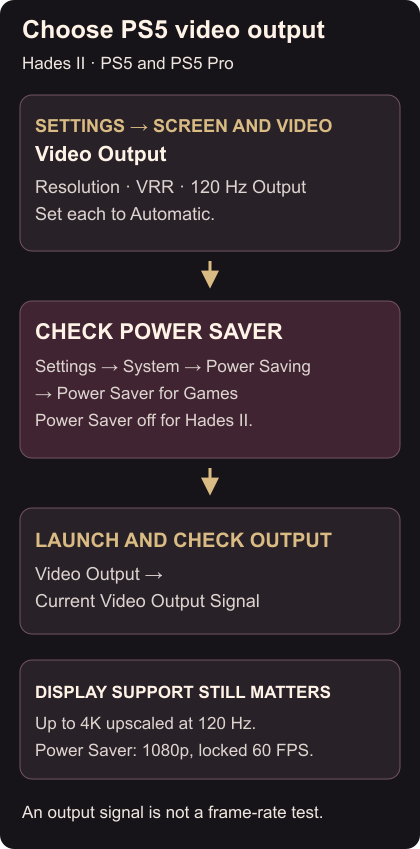
- Open PS5 Settings → Screen and Video → Video Output.
- Set Resolution, VRR and 120 Hz Output to Automatic.
- Open Settings → System → Power Saving → Power Saver for Games. Make sure Power Saver is not applied to Hades II when you want 120 Hz. For this game, Power Saver instead selects 1080p at a locked 60 FPS. Output and Power Saver settings
Launch Hades II, then check Current Video Output Signal on the Video Output page. Information for the Connected HDMI Device shows the display capabilities the console detects. Use these checks to distinguish the selected signal from the display’s supported options. Checking PS5 video output
If the result is still 60 Hz
Check Power Saver first. When it is active, its icon appears beside the game in Switcher in the control centre. Return to Power Saver for Games to change which games use it. Checking whether Power Saver is active
For a missing 4K/120 Hz option, check that the display supports that combination, use the supplied PS5 cable or a suitable Ultra High Speed HDMI cable, and use the appropriate HDMI port. Consult the display manual for any required port setting. If enabling 120 Hz causes video problems, turn 120 Hz Output off while resolving the connection issue. 4K/120 Hz troubleshooting
A 120 Hz output signal does not establish a constant rendered frame rate. Once the screen is ready, set your Grasp capacity and equip a Keepsake before the next run.