
Check Your PC Before Installing GTA V Enhanced
On this page
Check the Enhanced requirements before downloading GTA V on PC. The Legacy requirements describe a different version, so a PC that runs Legacy still needs a fresh comparison.
Compare the Enhanced requirements
| Part | Minimum | Recommended |
|---|---|---|
| Windows | Windows 10, version 1909 or later | Windows 11 |
| CPU | Intel i7-4770 / AMD FX-9590 | Intel i5-9600K / AMD Ryzen 5 3600 |
| RAM | 8 GB | 16 GB, dual-channel |
| GPU | GTX 1630 / RX 6400, 4 GB VRAM | RTX 3060 / RX 6600 XT, 8 GB VRAM |
| Storage | 105 GB on an SSD | 105 GB on a DirectStorage-compatible drive |
The minimum audio requirement is DirectX 10 compatibility. These are Rockstar’s Enhanced specifications; the recommended list does not promise a particular frame rate.
Find your PC’s details
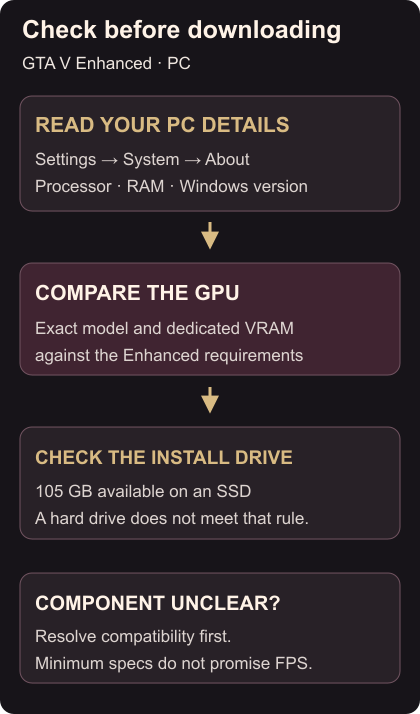
- Open Settings → System → About. Read the processor and installed RAM under Device specifications, then Windows version under Windows specifications.
- Open Settings → System → Storage to check available space. For another drive, use Advanced storage settings → Storage used on other drives. Windows device information
- Compare your graphics-card model and its dedicated VRAM using its manufacturer specification. Confirm that the intended installation drive is an SSD. Having enough free space on a hard drive does not meet the SSD requirement.
If a component is unlisted, check its compatibility before committing to the download. Rockstar warns that some integrated and mobile graphics hardware may be unsupported. Internet access is also needed for activation and periodic entitlement checks.
Ready to move your progress? Import a Story Mode save. If an installed copy has problems, verify its files.