
Choose Topspin, Backspin or Side Spin
On this page
Choose spin in Miniclip’s mobile 8 Ball Pool when you want to change where the cue ball goes after contact. A centre strike is the default; you don’t need spin on every shot.
Move the strike point
Tap the cue-ball icon in the screen’s corner. Drag the red circle to the point you want to strike, then release it. This changes the strike point. To change the ball’s starting position on the table, use the cue-ball placement steps instead.
Match the spin to the next position
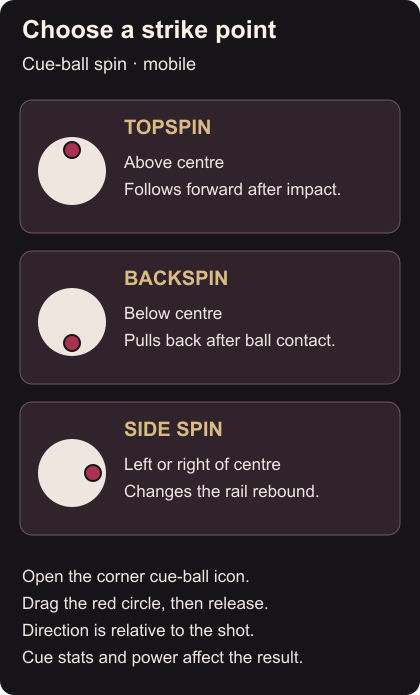
- Topspin: choose a point above centre to make the cue ball follow forward after impact.
- Backspin: choose below centre to pull it back after hitting the object ball.
- Side spin: choose left or right to change its sideways movement when it rebounds from a rail.
Spin strength depends on your cue’s stats and shot power. Start with one direction before combining effects such as top-right. Spin controls and effects
Left and right are relative to the direction of the shot, from the cue ball’s viewpoint. They aren’t fixed directions across your phone’s screen. Spin direction
Decide whether you want the ball to follow forward or come back before choosing spin. Watch its path after contact, and keep the same cue while getting used to that effect. Use the aim and power settings if the basic controls need adjusting first.