
Lower Storm Hostility Before Villagers Leave
On this page
Check hostility before the Storm arrives, while there is time to move workers and protect your fuel. This guide covers ordinary PC base-game settlements on Settler through Viceroy, without special map modifiers. It focuses on low Resolve caused by storm pressure, starting with the woodcutters you can reassign immediately.
Read the coming storm
Near the end of Clearance, pause and inspect the Forest Mysteries. Read their activation levels and effects, then open the hostility breakdown under the eye indicator. Assigned woodcutters contribute hostility alongside factors such as elapsed years, population and opened glades. The amounts vary with difficulty. Hostility
Look at each species’ Resolve and identify the one closest to trouble. Its panel shows the needs and effects contributing to that result. Resolve below one starts the departure process; a villager does not necessarily leave the instant the value falls. Resolve
Check that the Ancient Hearth has a firekeeper and usable fuel. An extinguished hearth adds a serious Resolve penalty, so protect its basic operation before assigning people to optional work. Hearth
Remove woodcutters until a useful threshold changes
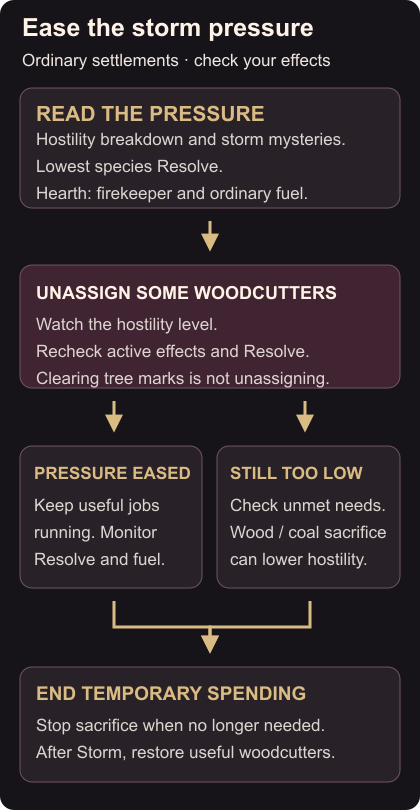
Open a Woodcutters’ Camp and unassign a few workers. Watch the hostility level, then repeat only as needed. Removing assigned woodcutters reduces their contribution; merely clearing tree markings is not the same action. Woodcutter hostility
Look for a useful level change, then recheck Resolve and the active mysteries. Lower points within the same level may not remove the penalty troubling you. Even level zero has a Storm effect from Looming Darkness, so reaching zero does not guarantee that every species will be comfortable. Storm effects
Avoid treating every storm as an instruction to empty every camp. Keep enough workers assigned for the conditions you actually face. If the removed workers have useful available jobs elsewhere, move them there, remembering where they need to return afterward.
If Resolve remains poor, inspect the weakest species again. Check whether existing housing has space and whether a food supply you already produce is running out. Fix an available need before committing scarce materials to a building that will finish too late.
Use a fuel sacrifice when it earns time
At the Ancient Hearth, sacrificing wood or coal reduces hostility while active. Other fuels have different sacrifice effects. Use the controls to add the smallest useful amount, then check whether the hostility level and Resolve improve. Sacrificing
Watch the fuel stock after unpausing. Sacrifice spends resources quickly, and the hearth still needs its ordinary supply. If the intervention is no longer needed, reduce the sacrifice stacks to zero. The Stop after storm option can end it with the season. Sacrifice controls
Do not remove the firekeeper while moving several workers between jobs. Keep the hearth’s normal operation separate from the temporary fuel spending you are using to relieve pressure.
Restore production after the storm
When the weather changes, check the hearth controls and put useful woodcutters back to work. Review the fuel you spent before returning every other building to its previous workload.
Use production limits and ingredient controls to investigate recipes drawing down that fuel. The Small Farm season guide helps you plan other seasonal worker moves without missing planting or harvest.